Goto window –> preferences –> server –> RuntimeEnvironments
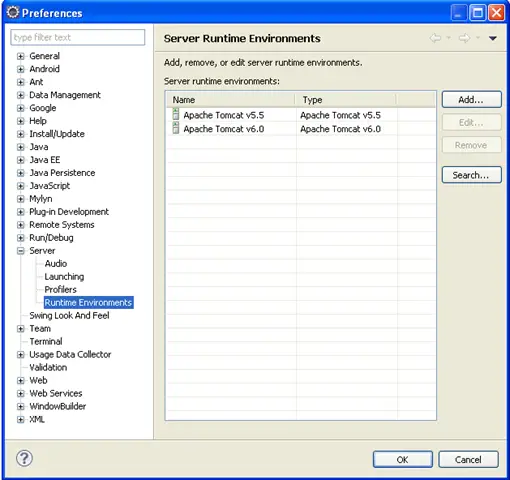
Then Click Add

 Buttar
 In JSF, managed bean means this java class or bean can be accessed from a JSF page.
In JSF 2.0, you can use the @ManagedBeanannotation to indicate this is a managed bean.
@ManagedBean(name=””)
@sessionScoped
Write this at the start of the class to indicate that this is managed Bean And can be accessible according to its Scope.
take the bean class name, change the first letter to lower case, and use that as the managed bean name.
The Purpose of this tutorial is to Demonstrate the New introduced Web Axis2 Web service Tool using WTP 2.0 Driver .This tutorial will show how to develop a simple Web Service and Web Service Client Using JAVA . We Create A simple Web Service Containing Java Class Which Concatenate two Input String Value .
Above given error can occur if you have installed updated java on your server and a shadowed copy of java has been placed in the windows directory. Due to any reason the java which is originally installed got corrupted or removed from the system and installed another one, the shadowed copy of java will remain available in the windows directory. The above error sometimes go away by just setting up the path in the advanced properties of server but if its not being resolved by setting up the server path, please follow the under given instructions.
First check if the java installed on the system is working fine. You can check it by going to command prompt and entering the following command:
C:>java
Error is given as under:
Error occurred during initialization of VM
java/lang/NoClassDefFoundError: java/lang/Object
Using the command prompt navigate to the bin under JAVA directory and enter the above command again.
It can happen if you are using manual VPN connection and trying to connect to any Juniper VPN server from any Windows XP machine. Your system may behave quite normal, everything seems perfect but still you are not able to connect to VPN server. After restarting sometime the system gives the chance to connect to … Read more
I would like to share this good news to every reader of sizledcore that Media temple is offering free web hosting equal to 25$ per month. If anyone is interested and is looking for best web hosting, e-mail and FTP services please visit the under given link to claim your free web hosting credit. There … Read more
Error 1067 The Process Terminated Unexpectedly Apache Tomcat 6 Error 1067 The Process Terminated Unexpectedly Apache Tomcat 6 and you are not able to start the tomcat service. Cannot start apache tomcat6 service because the process terminated unexpectedly, you will see this error if you have installed apache tomcat6 on Microsoft Windows 2003 server along … Read more
Adding new area and iteration in Microsoft visual studio team foundation server 2008 is very easy but sometime it can go wild and leave you in the middle of nowhere except searching the internet and Googling around for hours. All this can happen if you have recently taken the backup and the system has created temporary files during the backup. The problem you will face at this time is the population of the newly created areas and iteration won’t appear in the bugs and tasks pane where you have to select the appropriate area and iteration at the time of creation.
How to add a new area and iteration is given as under:

If you are working with java based web application then you definitely have good idea about JBOSS web server. JBOSS web server is a best web server available to cater the JAVA web enabled web applications. JBOSS web server by default comes in zipped form and can be placed anywhere on system. A simple batch … Read more
One of my remote client was having this issue with her outlook. Outlook was working fine with the email one day ago and now it suddenly stopped working. After searching a little bit and Googling around I got the solution. First I would like to discuss the reason of this error, why this thing happen … Read more