
Microsoft windows 8 Pre-beta developer review is available for download and use. There are lot of new features added in windows 8 and of course you guys also needs to be aware about the tips and tricks involved in the usage of these new features. Most exciting feature of windows 8 is its metro style start menu and dual desktop where you can choose according to your needs that how you will use windows 8 on your device. Like if you have a desktop machine and you like to use windows 8 as a desktop operating system you can choose the desktop version and if you like to use your machine as a tablet you can choose the other desktop (touch screen). Microsoft Internet explorer 10 will be introduced with the launch of windows 8 and it is in the news that it will be ad-on free browser, first of its kind. New windows media player will be added in windows 8 along with advanced features. Enhanced and more powerful task manager will be the part of windows 8. I have few pictures of windows 8 features that I would like to share with the readers to have a better idea about the features described above.
 Buttar
Installer Error 1402: Could Not Open Key
During the installation of Nokia PC Suite if you are getting under given error please change the permission of the registry key using the instruction given below. This mostly happen when you are installing the new version of Nokia PC Suite on Windows Vista or 7 because these operating systems manage the security more strictly … Read more
Windows8 Exciting New Features
Windows8 pre-beta has been launched and most exciting features are the metro style start menu along with a Windows store where everyone can download Metro style applications along with conventional Win32 applications. Everyone knows about the features of Windows8 but I would like to share few of them that are really great.
Metro Style Start Menu
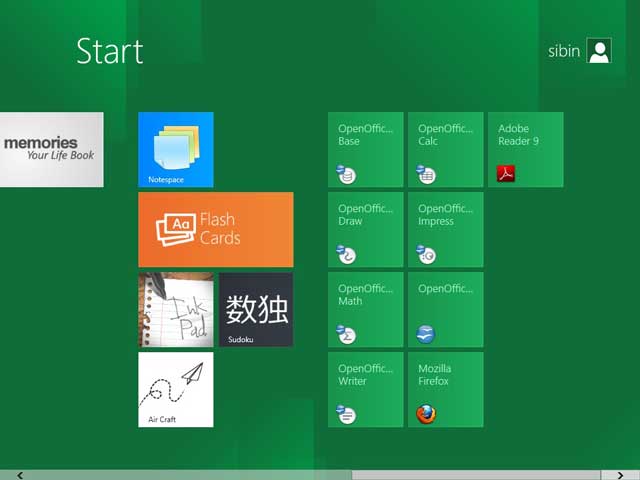
New start menu for Windows8 which is really cool and that is metro style, see the picture given below.

Metro style menu will make it very convenient for the ordinary users to select the desired application without wasting any time on finding the application from the legacy start menus like Windows XP.
Microsoft Windows8 Pre-Beta Launched
Windows8 is in news now a days and Microsoft has launched the pre-beta version. Microsoft is calling it Windows Developer Preview. If you like to explore this pre-beta there is no need to go and search around for the resources, ISOs and downloadable material required to install. Just go to Microsoft official website and click the download link. Visit the under given URL to have a complete list of available downloads and system specifications required to install this pre-beta.
Windows Developer Review Downloads

ASP.Net Version Registration Requirement During Installation
ASP.Net Version Registration Requirement During Installation Installation of Microsoft SQL Server on a Windows Server operating system is quite simple. You just need to start the installation process and follow the wizard. Some times it can create problems due to different architectures installed for different services. Same is the problem given in the heading of … Read more
Steve Jobs Has Resigned From Apple
I like to share this news with the readers who love Apple for its creativity and smartness. Apple has introduced a lot of big and great things in the computer and smart phone market like Apple Macintosh, IPhone, IPad, and IPod. All these things have a great thinking and vision of Steve Jobs. Steve Jobs … Read more
Download Fix For Windows 7 Random Freeze Problem
When Windows 7 Service Pack 1 was released, a lot of people were complaining about the problems they were getting after installation. A lot of experts also advised to stay away from SP1 because it was creating problems for some people although most of the people were fine even after the installation of Service Pack … Read more
Save And Manage Your Passwords Online With Mitto Online Password Manager
The Internet has exploded so much that we need to have a zillion different accounts on different Internet services. More and more people get frustrated as they have to remember and protect a lot of login information. This creates the need for password managers. A password manager can save your login information in a secure … Read more
Take Full Control Of Your System With Free Tools
A system administrator must have full control over a system and a network but if for some reason got it out of control you must know who to troubleshoot and do the repair work. To do a clean repair work you must know how and from where to start the investigation. All you want to do is to find cool, efficient and fast forensic tools to start the troubleshooting. Types of analysis might have nothing to do with the troubleshoot but its important to organize the tools in a better way so that you can find the appropriate one required for the troubleshoot.
Internet history analysis tools
Free Network Monitoring Tool
Monitor your network for free with NagiosXI. You can monitoring a complete network along with your servers including, DNS, DHCP, active directory, web server and many more. NagiosXI is free and you and its completely Linux based. There are Virtual machines available on the website that you just need to copy and start and you will be in control.
